
In continuing the series of the new Facebook Pages layout we will tackle the Page News Feed and Spam today.
NEWS FEED
This, to me, is the biggest change next to the ability to post a your page identity, an a change NOT for the better. Prior to this your Page wall showed posts in latest posted order.

Now posts are given a rating by facebook and status as to what is more important and makes the ‘tops news’ feed. They have made a quick change to this since the update and now you have the Recent Posts option, so you can click on the Recent Posts to see them in time-date order.
Keep an eye on how you are seeing your News Feed so you are not missing valuable posts by people connected to your page.
The other aspect of this rating system is that it applies to all content – posts/activity by you, the page, people who like the page and pages who like the page – everything, not just wall posts.
SPAM
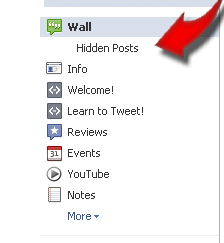 Facebook will still mark certain content as ‘spam’ and now it gets placed in the left links/menu section of your Facebook Page directly under the “Wall” link. The link you are looking for is called : “Hidden Posts”.
Content placed here by Facebook can be deleted or marked as “not spam” in order to get it back onto your facebook page. To me it appears that having lots of links makes you a candidate for spam by Facebook. I have learned this with my Networking Wednesday Activity. I encourage people to post on my Facebook page every Wednesday as a way to network with the other people here. That tends to be the day I get some spam – not because it is spam but because I encourage people to share their website or facebook page links.
People that do this sometimes I will find in the Spam container “Hidden Posts”. That tells me adding a lot of links will get you noticed by Facebook and not in a good way. As long as the Page owner un-marks you then the update will show where it should.
Use this lesson as a reminder to :
- Check your own Pages Hidden Posts tab and
- Be Cautious when posting on other pages to not overdo it with links. And unless invited (like on my page) or as a genuine need to make your update complete, use links with caution when posting on other pages.
If someone is posting spam, and sometimes it is indeed spam, then you can block them from your page, one of the options in your Hidden Posts section, click the x on the spam post and you will see the choices to mark “not spam” as well as “block” the person. With the updates to Pages, there does not yet appear to be any way to block a “page” from your business page.
Facebook has also added a “Moderation and Profanity” Blocklist section to your Manage Permissions tab under “Edit Pages”. These allow you to block people from posting specific keywords and certain levels of profanity from your page. This will help control spam if you have been having an issue as well.

These new upgrades will really help people keep better tabs on the content posted on their facebook pages and I think a great step in making pages much more user friendly and easier to manage as well.

Stop Struggling and Start Thriving! My passion is helping to guide people just like you, private practice and service-based business owners, who are often frustrated with all their wasted time spent on marketing that gets you nowhere. You can learn strategies to attract a steady flow of clients and build a thriving and profitable practice. Get started with some of the free resources on my Pepper It Marketing website, especially this Guide to Streamline your Marketing. I also offer several self-study training programs to help you attract more clients so you can Build a rewarding and profitable private practice and still have time to LIVE your LIFE!