
Video can be an integral part of any online marketing campaign.
PLUS! There is an Easy Way to Get People to Watch More of Your Videos. Having a YouTube channel is one of the easiest ways to get your marketing videos online and in a place where people are searching for solutions. Your videos can be small solutions that lead viewers to the next step… your products/ services / programs.
When you get into using more and more videos, you will find yourself with a lot sitting there on your YouTube channel. And disorganized videos will not help any prospect. Remember the mantra… If you confuse them, you will lose them.
What I like to do is organize my videos into Playlists on YouTube.
These are an easy way to organize the videos so when someone stumbles upon one video, there is n natural way for them to see another and another and … well, you get the idea. YouTube Playlists can help people view more of your videos by placing them in to an easy-to-view list versus a long and drawn out stream of videos that have no rhyme nor reason as to what the video is, or what the topic is about.
Remember the marketing mantra?

Playlists help with this. They are an ideal way to help you get more people finding and watching your videos on YouTube.
YouTube playlists will help in 3 main ways:
1. Create an easy way for visitors to find and look through the videos you have.
2. People can see all the content you have to offer them, not just the one video they landed on. The overview of the topics may help them keep exploring and not just for the topic they came for.
3. Another way for your videos to show up in he YouTube search results… playlists also are shown as results, not just single videos.
Soooo…. how do you create these playlists? It’s a lot easier than you might think!
1. Start with a video that you want in the playlist. You might be uploading it or accessing it after it is already there.

2. If uploading a new video, there is a place where you can click, add to playlist in this process. Above, you’ll see that in the lower righthand corner.
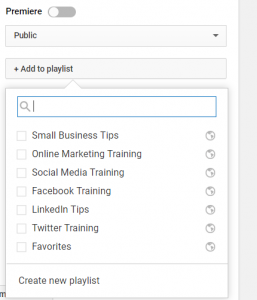
3. Then you choose the playlist name or make a new one, as you can see above.

4. If it is a video you are optimizing (as it is already on YouTube) in the edit video page, on the right column, click “Add to Playlist” and tick the playlist name to add it to, or make a new one. You can see a screenshot of this above.
5. Use the drop-down box to select your playlist’s privacy setting. If it’s private, remember only you can view the playlist (which BTW is counter-intuitive to the purpose of playlists, so don’t do it).
To find your playlists:
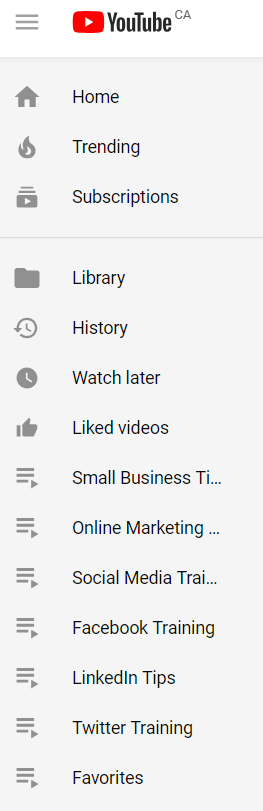
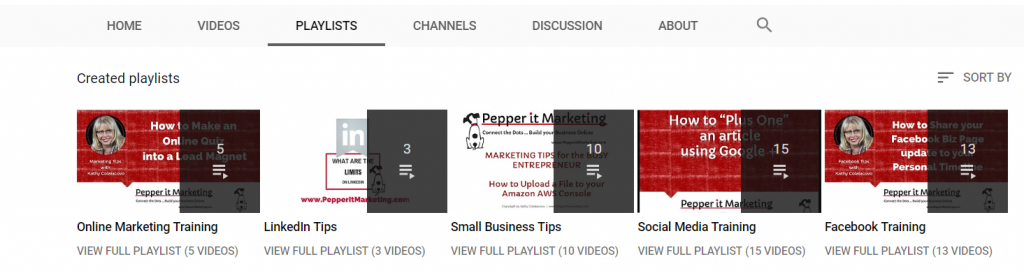
Go to your own YouTube Channel and click “playlist” in the YouTube menu for your channel or when you are in your channel/ creator studio, they will show in your menu on the left of the page, too.
Each YouTube playlist has their own unique URL
You can now use this to share the entire list with people. If you want to see all my videos with tips for using Facebook, click this link.
That link will take you to that full playlist where you will see one main video and then the others in the list will be shown on the screen as well
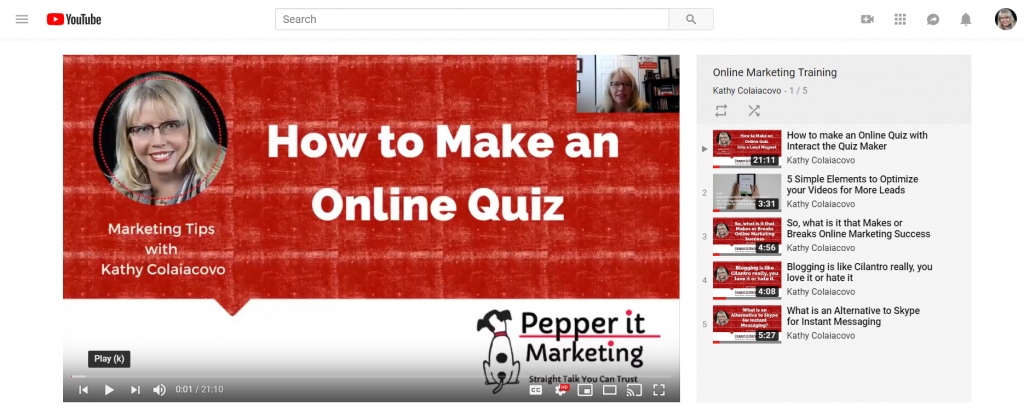
There you have it… some of the basics of creating a YouTube playlist and the benefit of using them. Stay tuned next time as I show you several ways to use these playlists in your marketing.
Looking for more ways to get marketing strategy and tips like this, but tailored for your business? And more importantly, in a way that doesn’t break the bank?
Check out the Pepper it Marketing Mastery Inner Circle, this membership program offers you all sorts of video training, checklists, resources, handouts and four (yes 4) live sessions each month. Sessions where you get new monthly LIVE training on new topics that can help your marketing, and two LIVE review sessions where we review the members marketing items to offer ideas, feedback and strategy. Check out all the details here.
P.S. Here are some PRO Tips on YouTube Playlists:
1. Do not make too many or it will be just as confusing as having no playlists.
2. Pick topics that are more like your blog categories, keyword rich titles that are the main focus topics of your business.
3. Choose Playlist titles that will make sense to viewers so they will explore.
4. If you have a verified account you can make a series playlist, which is a way to show people that a set of videos should be viewed together.

Stop Struggling and Start Thriving! My passion is helping to guide people just like you, private practice and service-based business owners, who are often frustrated with all their wasted time spent on marketing that gets you nowhere. You can learn strategies to attract a steady flow of clients and build a thriving and profitable practice. Get started with some of the free resources on my Pepper It Marketing website, especially this Guide to Streamline your Marketing. I also offer several self-study training programs to help you attract more clients so you can Build a rewarding and profitable private practice and still have time to LIVE your LIFE!